Sample output
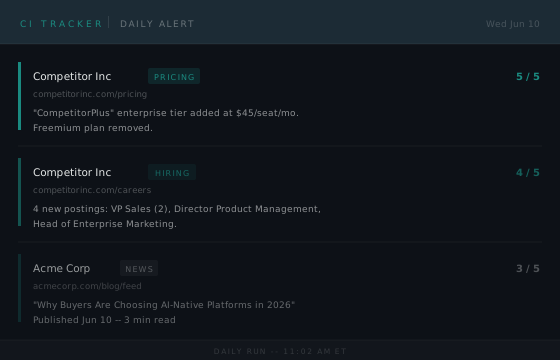
Projects / Competitive Intelligence Tracker
An AI classifier reads every signal and scores it by importance. You get an alert when something matters. Everything else rolls up in a weekly digest. Runs free on GitHub Actions with no server required.
Most competitive intelligence is a tab you check when you remember to. A competitor launches a new product, updates their pricing page, or starts hiring aggressively into a new territory. By the time you notice, the cycle has already played out.
This tool makes CI continuous. A GitHub Actions workflow runs every day. It monitors competitor websites for copy changes, tracks new job postings by department and seniority, watches review platforms for rating shifts, follows RSS feeds, and searches relevant subreddits for mentions. Every signal gets passed to an AI classifier that assigns a category and an importance score from 1 to 5. Score 4 or above sends an immediate plain-text alert. Everything below rolls up in a Monday morning HTML digest.
Gemini is the default classifier. It runs on Google's free tier, so the AI layer costs nothing to operate. Prefer Claude? Swap in Anthropic's Haiku by setting a different API key. Want to use a specific model version? One environment variable controls it. If you'd rather run with no AI dependency at all, a keyword-based fallback handles classification without touching any external API.
Configure it once in a YAML file. Push it. It runs itself.
GEMINI_API_KEY (free from Google AI Studio), SMTP_HOST, SMTP_PORT, SMTP_USER, SMTP_PASSWORD, and ALERT_EMAIL. Gmail works fine with an app password.
base_url, add pages you want to diff, set watch keywords for terms you never want to miss, and configure which signals to track and at what alert frequency.
data branch automatically to store snapshots and event history.
| Signal | How it works |
|---|---|
| Website diffs | Playwright scrapes the pages you specify and diffs the text against a saved snapshot. Reports added and removed fragments. Cookie banners and navigation noise are filtered out automatically. |
| Job postings | Scrapes careers pages, extracts job titles, and detects new openings since the last run. Filterable by department and seniority level so you only hear about the roles that matter. |
| Reviews | Monitors G2, Gartner Peer Insights, Capterra, TrustRadius, PeerSpot, and Spiceworks for new reviews and rating changes. Configure per-company which platforms to include. |
| RSS / News | Polls RSS and Atom feeds for new articles. Automatically escalates to a daily alert when a watch keyword appears in the title or summary. |
| Searches configured subreddits for company name mentions and custom search terms via RSS. Tracks post IDs to avoid duplicates across runs. |
Every signal passes through an AI classifier before it's alerted or digested. The classifier assigns a category (pricing, product, hiring, messaging, funding, and so on) and an importance score from 1 to 5. Events at or above your configured significance_threshold (default: 4) trigger an immediate alert. Everything below goes to the weekly digest only.
| 5 | Act today. Funding, acquisition, exec departure, pricing overhaul, product launch. |
| 4 | Significant. Messaging shift, notable hire, new integration, partnership announcement. |
| 3 | Moderate. New blog post, minor copy change, new review, job posting. |
| 2 | Low signal. Logged, not alerted. |
| 1 | Noise. Ignored. |
Default: Gemini. The tool ships configured for Google's Gemini Flash Lite model, which is available on the free tier at Google AI Studio. Get a key in two minutes, paste it as a repo secret, done. No credit card required.
Prefer Claude? Set ANTHROPIC_API_KEY instead and the tool uses Claude Haiku for classification. Runs about $1/month at daily frequency. You can also set both keys and get Gemini as primary with Claude as the fallback if Gemini errors out.
Want a different model? Set the GEMINI_MODEL environment variable to any Gemini model string and the classifier uses that instead of the default.
No AI at all? Skip both API keys and the tool falls back to deterministic keyword-matching rules. Less nuanced, but zero external dependencies and still useful.
Watch keywords are optional per-company terms that instruct the classifier to bias scores upward when those terms appear in a signal. Use them for product names, executive names, or strategic events you cannot afford to miss.
Sample output